
How to see the latest Instagram search queries
There are two kinds of searches on Instagram.
The first kind is the one you do every day: looking up an old friend, checking out a new restaurant, or searching for a specific niche hashtag like #firsttimeauthor. Instagram records these for you in your Recent Searches, and that's useful for finding your own history.
But the second kind is the search that actually matters for growing your presence, discovering new creators, or simply staying up-to-date with the world: What are other people searching for right now? What topics are exploding in popularity? What are the public trends that everyone is suddenly talking about?
This second kind of data, the real-time pulse of Instagram, is what the platform keeps hidden. And for good reason: it’s the key to visibility. If you know what people are searching for, you know what content to create, and you know where to find new customers or collaborators.
At RecentReborn, we believe this information should be accessible to everyone, not just the "elite" accounts with large teams and private data tools. We built our entire platform because Instagram removed the "recent" hashtag tab, essentially locking the door to real-time discovery. We decided to create a window of our own.
Your Own Search History vs. The World’s Trends
When people ask, "How do I see my latest Instagram search queries?", they are usually looking for one of two things:
1. How to See Your Own Recent Search Queries (The Easy Way)
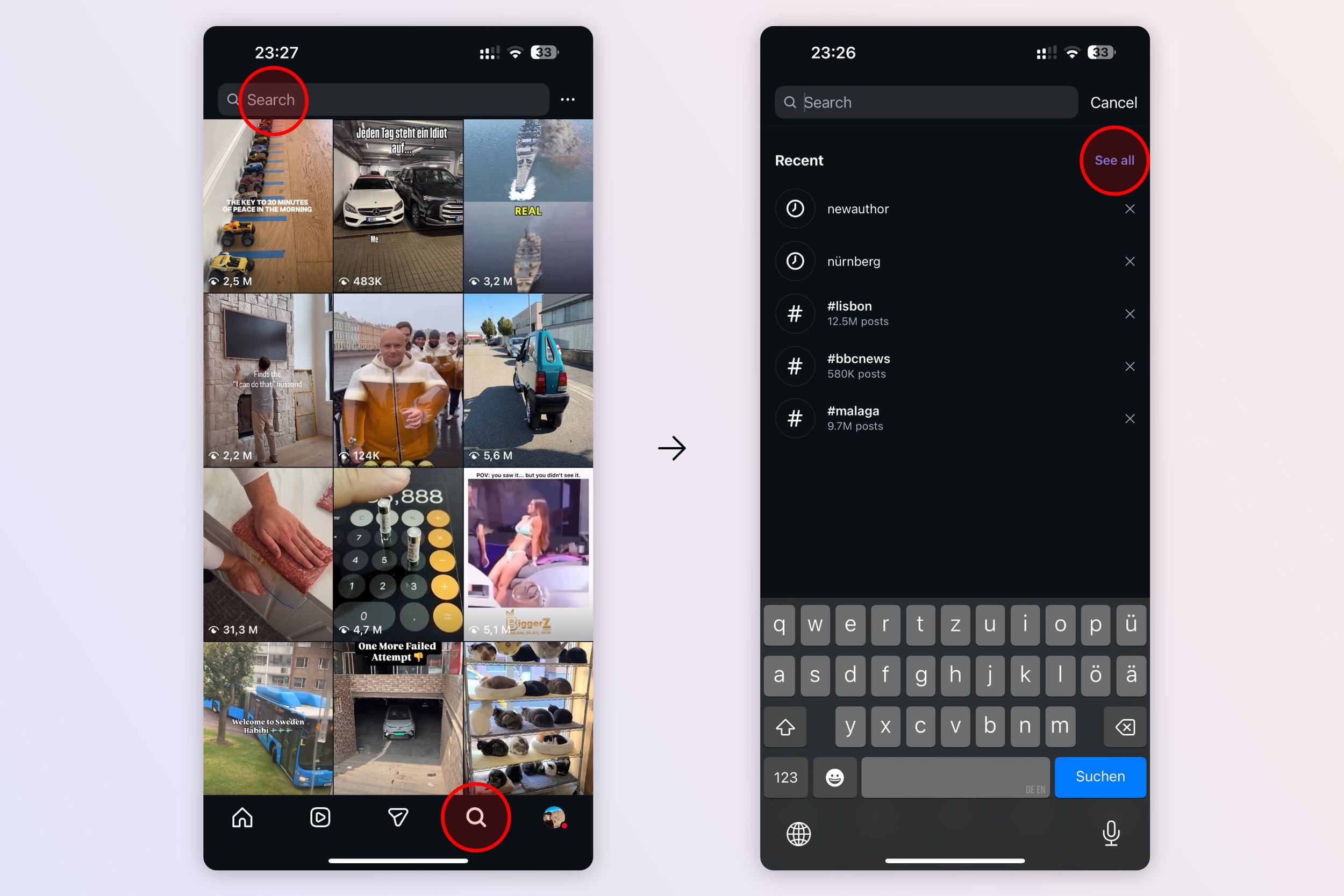
If you just want to see the accounts, places, and hashtags you personally looked up, Instagram makes this pretty easy to find:
-
Go to the Search & Explore page (the magnifying glass icon).
-
Tap on the Search Bar at the top.
-
The list that appears is your own Recent Searches. You can see the people, tags, audio, and places you have looked up.
-
Click “See all” to get to the full list
This history is private to you and is helpful for quickly repeating a search. If you ever want to clear it out, you can usually find that option under Settings and privacy > Your activity > Recent searches.
2. How to See the World’s Latest Search Queries (The Hard Way)
This is the challenging part, and the reason we built a tool for it.
Instagram does not offer a public list of the latest, top-rising, or trending search queries. They don't want you to know this. Instead, when you land on the Search & Explore page, you see content that the algorithm thinks you will like. When you type in a search term, the results are almost always weighted toward "Top Posts", content that is already popular and often days old.
This system guarantees that small accounts struggle to gain visibility, and it limits the ability for everyone else to follow real-time trends. If you're running a small business, a photography page, or a fan account, this silence on trending topics is frustrating. You need to know what people are searching for now to get in front of them.
The Solution: Our Map to Trending Instagram Hashtags
Since Instagram won't tell you what people are searching for, we built a tool to show you the data that proves it: the hashtags that are trending right now.
We are excited to share our constantly updated page:
https://www.recentreborn.com/trending-hashtags-on-instagram
This page is a live map of the topics that are exploding in popularity on Instagram. We designed it to be the first step in a powerful two-step discovery process.
Why Trending Hashtags Are the Key to Latest Searches
While Instagram won't give you a list of every keyword being typed, tracking trending hashtags is the next best thing. When a topic is searched, people post about it. When a lot of people are posting about it using a specific tag, that tag starts to trend. This is how you indirectly see what the masses are focusing on.
Here is what our new page does:
-
Identifies the Trend: It shows you the hashtags that are gaining traction and being used widely in real-time. This is the data that tells you what people are actively searching for and consuming.
-
Breaks it Down by Country: Trends are local! What’s viral in one part of the world might be irrelevant in another. We give you a filter to focus your efforts exactly where you need them.
How to Use RecentReborn to Unlock Trending Queries
Our new trending hashtags page is only half the solution. The real power is in combining this knowledge with the RecentReborn app.
Remember the problem: You find a great trending hashtag, but when you search it on Instagram, you only see the old, "Top Posts."
Here is how you fix that and actually see the content associated with those latest searches:
-
Find a Trending Hashtag: Visit our new page and select a hashtag that is high on the list for your country or niche. This tells you what people are searching for.
-
Search on RecentReborn: Take that exact hashtag and search for it on our website or app.
-
Discover the Latest Content: Instead of the old "Top Posts," RecentReborn will show you the recent posts and reels using that tag.
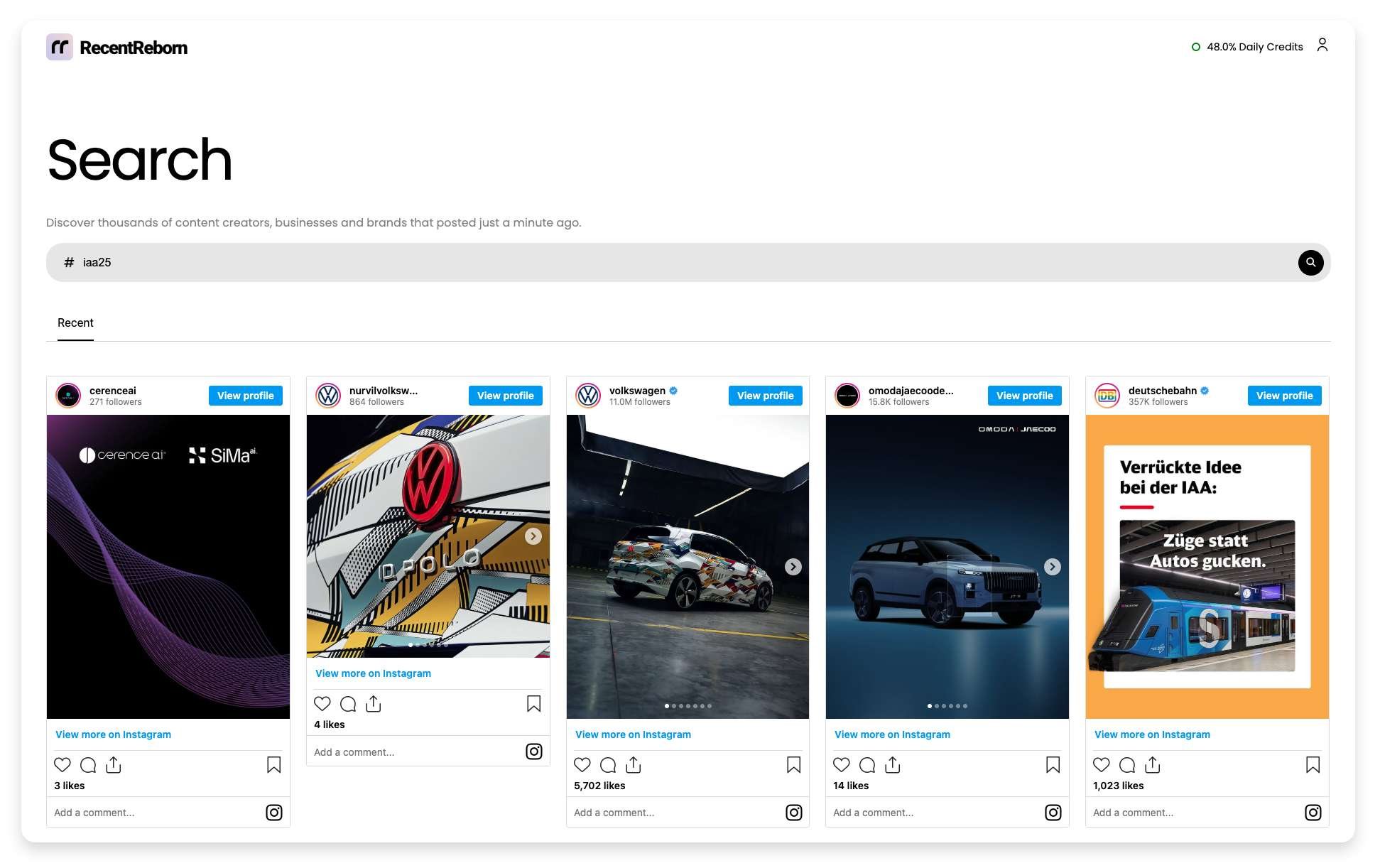 Screenshot of RecentReborn
This process lets you do two things the native app prevents:
-
Find New Creators: You can now see the posts from the "little guys", the first-time authors, the new photographers, and the small businesses who are trying to join the conversation.
-
Engage Authentically: By seeing and interacting with posts that were shared just moments ago, you build genuine connections and drive targeted traffic, rather than leaving comments on content that has already run its course.
The combination of knowing what people are searching for (via our Trending Hashtags Page) and seeing the latest content posted under those topics (via RecentReborn) restores the dynamic, real-time discovery that Instagram took away.

About the Author
Felix Melchner
I built RecentReborn because Instagram’s decision to hide recent posts made it impossible to find real people and small creators who are not already famous. My vision for 2026 is to restore the original soul of social media by giving everyone a fair chance to be discovered and supported through chronological search.
recentreborn.com